
Top 8 Puppeteer Alternatives and Competitors in 2026
Puppeteer remains one of the most popular Node.js browser automation libraries — but it's also one of the most constrained. Chrome and Chromium only. No built-in test runner. No scheduling. No visual regression. Puppeteer is excellent at what it was designed for (headless Chrome automation, web scraping, PDF generation), but teams that want a complete end-to-end testing framework routinely outgrow it.
This guide covers 8 Puppeteer alternatives evaluated in April 2026: what each does better than Puppeteer, what trade-offs to expect, and how to decide which one fits your stack.
Why Teams Move Beyond Puppeteer
Puppeteer's architectural constraints matter at scale:
- Chrome/Chromium only. No Firefox. No WebKit/Safari. If any user on your platform uses Safari — and they do — you're flying blind.
- No test runner built-in. You must integrate Jest, Mocha, or another runner. Each adds configuration overhead.
- No scheduling or managed execution. Puppeteer is a library, not a platform. Cron runs, CI orchestration, parallelism — you build all of that yourself.
- No visual regression. Puppeteer can take screenshots, but comparing them programmatically requires building pixel-diff infrastructure from scratch.
- JavaScript/TypeScript only. No Python, Java, or C# bindings.
The list above describes exactly what Playwright added when Microsoft rebuilt Chrome DevTools Protocol automation from scratch in 2020.
The 8 Best Puppeteer Alternatives in 2026
1. ScanlyApp ⭐ Editor's Pick
Best for: Teams that want a managed cloud QA platform with scheduling, visual regression, and CI/CD integration — without building the execution infrastructure themselves.
ScanlyApp is the natural next step for teams that have outgrown Puppeteer's scraping-library origins and want a proper testing platform. Connect your project URLs, configure your scan flows, and get scheduled cloud execution with visual diff on every run and a non-developer dashboard that QA managers can actually use.
Head-to-head: Puppeteer vs ScanlyApp
| Feature | Puppeteer | ScanlyApp |
|---|---|---|
| Browser support | Chrome/Chromium only | Chromium, Firefox, WebKit (Pro plan) |
| Test runner | Bring your own (Jest etc) | ✓ built-in |
| Visual regression | Manual screenshot diff | ✓ automatic pixel-diff per run |
| Scheduling | ✗ (cron / CI manually) | ✓ cron + on-demand + CI-triggered |
| Non-dev dashboard | ✗ | ✓ |
| Self-hosted option | ✗ | ✓ via Docker |
| Multi-language | JS/TS only | JS/TS, Python, Java, .NET |
| API testing | ✗ | ✓ |
| Cloud parallel execution | ✗ (manual setup) | ✓ built-in |
| Pricing start | Free | $29/month |
| Free plan | ✓ (OSS) | ✓ |
Pricing: Starter $29/month · Growth $79/month · Pro $199/month. Per-project model — no per-seat charge.
Verdict: If you're using Puppeteer to run scheduled Chrome tests against your production app, ScanlyApp is the platform-level layer you've been building yourself. You get visual regression, Lighthouse performance tracking, severity-ranked reports, and scheduling — all without the infrastructure burden.
2. Playwright
Best for: Teams that want the most direct, powerful Puppeteer upgrade — and are happy to manage their own execution infrastructure.
Playwright is the most direct Puppeteer evolution. It was created by several of the same engineers who built Puppeteer at Google, then rebuilt at Microsoft. The API is deliberately similar, and the migration path is shorter than any other alternative.
What Playwright adds over Puppeteer:
- True cross-browser: Chromium + Firefox + WebKit in a single API
- Multi-language: JS/TS, Python, Java, .NET — all first-class and officially maintained
- Built-in test runner with
@playwright/test - Auto-wait for every action (eliminates most flakiness)
- Trace viewer with network timings, DOM snapshots, and video recording
- Network interception with
page.route()— no proxy needed
Pricing: Free and fully open source. 81,600+ GitHub stars (as of April 2026).
Migration effort: Low-to-medium. The core API (selectors, page interactions, network) maps closely. The test runner is different, and parallel execution setup changes.
3. Cypress
Best for: JavaScript/TypeScript front-end teams that want an opinionated, debugger-first testing experience.
Cypress takes a fundamentally different architecture than Puppeteer: it runs tests inside the browser process, giving direct access to the app's JavaScript environment. This enables unique debugging features like time-travel test replay and direct cy.intercept() network stubbing without external proxy setup.
Pricing: Free for local testing. Cloud from $75/month.
Key differentiator vs Puppeteer: Cypress is a full test framework — runner, assertions, debugging UI, parallelism — in a single install. Puppeteer requires assembling those components separately.
Limitation: JS/TS only. No Python, Java, or C#.
4. Selenium WebDriver
Best for: Teams with existing Selenium infrastructure, or teams using languages that aren't supported by Playwright (rare, but relevant for some Ruby/PHP shops).
Selenium predates both Puppeteer and Playwright. It supports the broadest language matrix (Java, Python, C#, JS, Ruby, PHP), which is occasionally still decisive for legacy stacks. Selenium Grid provides self-hosted parallel execution.
Pricing: Free and open source.
Limitation vs Puppeteer: Slower execution, more verbose API, higher maintenance. Teams moving from Puppeteer to Selenium are moving to an older paradigm — usually only the right call when language constraints force the decision.
5. WebdriverIO
Best for: Node.js teams that want WebDriver protocol compatibility with a modern async/await authoring experience.
WebdriverIO is a mature Node.js testing framework that wraps WebDriver in a clean API. It supports both WebDriver (for grid compatibility) and Chrome DevTools Protocol (for Puppeteer-level speed). For Node.js teams moving away from Puppeteer who want cross-browser coverage but don't want to fully commit to Playwright's API, WebdriverIO is a smooth middle path.
Pricing: Free and open source. TrustRadius: 9.6/10.
6. Katalon Studio
Best for: Teams with mixed technical skill levels that want automation with a low-code option.
Katalon wraps Selenium and Playwright in an IDE with a visual test recorder. For QA engineers who don't code in JavaScript and can't adopt raw Puppeteer or Playwright, Katalon's record-and-playback lowers the barrier significantly. Enterprise tier adds AI self-healing locators.
Pricing: Free tier. Pro from ~$60/month (or ~$208/month at full enterprise rate).
7. Testim
Best for: Teams that want AI-powered self-healing tests to reduce selector maintenance overhead.
Testim uses machine learning to identify test elements using multiple attributes simultaneously, which makes tests more resilient when UI changes. Rather than a hard-coded CSS selector, Testim uses a stability score across many attributes to keep tests green through design iterations.
Pricing: Custom enterprise pricing, approximately $300/month for team plans.
Limitation: Proprietary platform. Your tests are locked into Testim's format — migration cost if you leave is high.
8. AskUI
Best for: Teams that want an AI-powered, prompt-based approach to UI automation.
AskUI uses computer vision and large language models to interact with UIs by describing elements in natural language rather than writing CSS selectors. Early adopters report significant reductions in test maintenance overhead when UI structure changes.
Pricing: Free tier. Paid plans from $29/month.
Status: Emerging technology. Less mature than Playwright or Cypress for production testing at scale.
Pricing Comparison
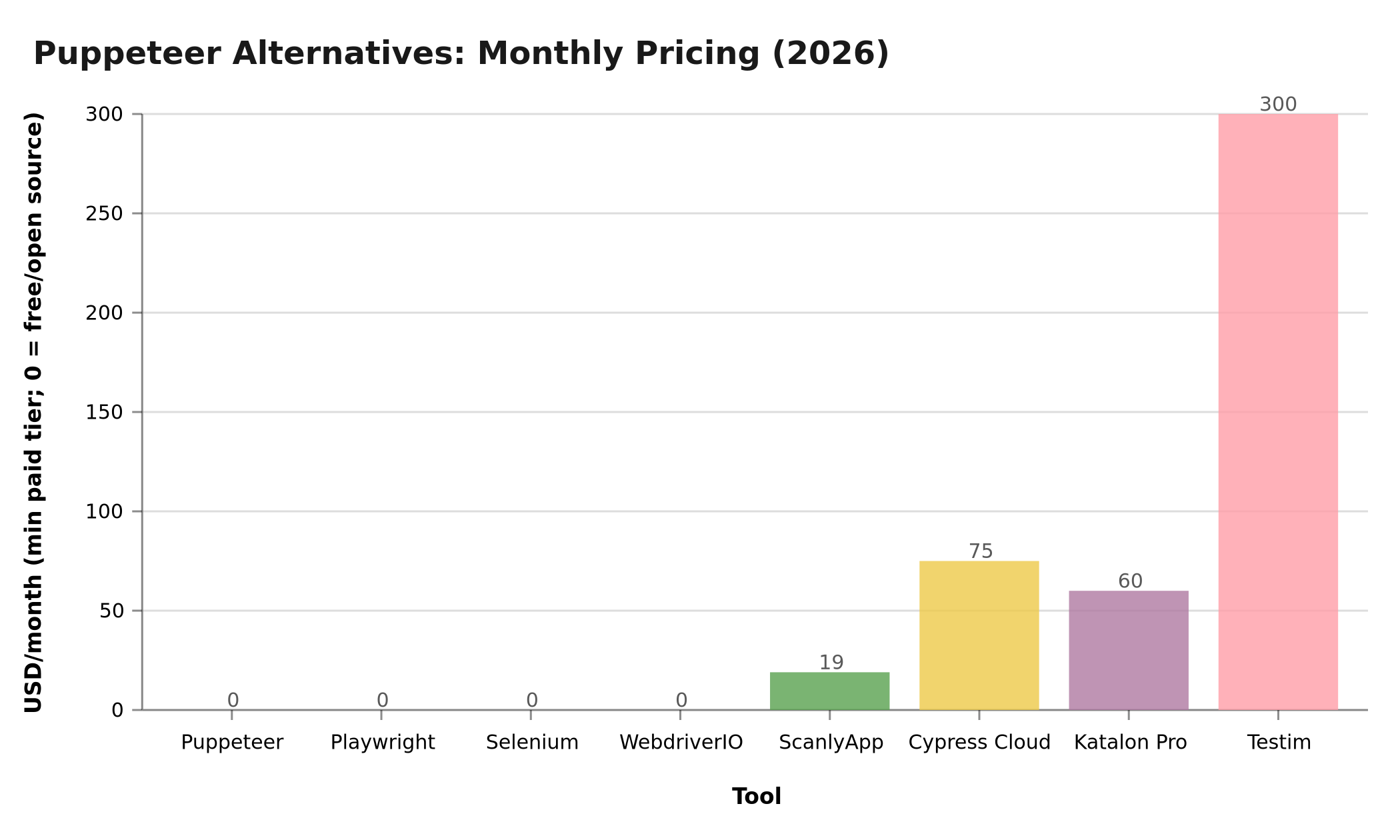 Figure: Lowest monthly paid tier across 8 tools. Open-source tools are free. Data: vendor pricing pages, April 2026.
| Tool | Free Plan | Lowest Paid Tier | Cross-browser? |
|---|---|---|---|
| Puppeteer | ✓ (OSS) | Free | Chrome/Chromium only |
| Playwright | ✓ (OSS) | Free | ✓ Chromium+FF+WebKit |
| Cypress | ✓ (local) | $75/month (Cloud) | ✓ (Chrome-first) |
| Selenium | ✓ (OSS) | Free | ✓ all major browsers |
| WebdriverIO | ✓ (OSS) | Free | ✓ |
| Katalon | ✓ (limited) | ~$60/month | ✓ |
| Testim | ✗ | ~$300/month | ✓ |
| AskUI | ✓ | $29/month | ✓ |
| ScanlyApp | ✓ | $29/month | ✓ (via Playwright) |
Feature Radar: Puppeteer vs. ScanlyApp
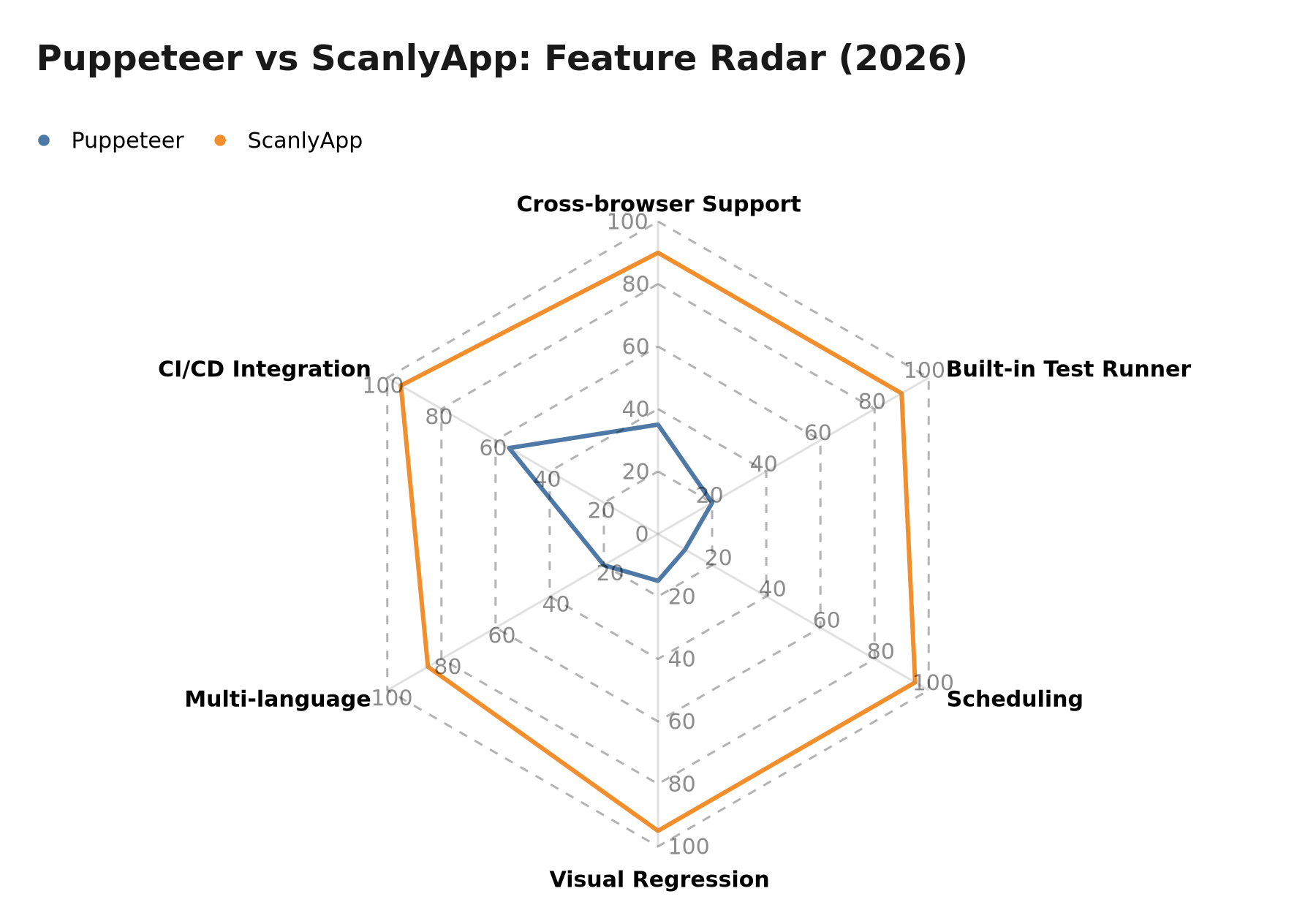 Figure: Feature scores (0–100) comparing Puppeteer and ScanlyApp across Cross-browser Support, Built-in Test Runner, Scheduling, Visual Regression, Multi-language Support, and CI/CD Integration. April 2026.
Migrating from Puppeteer to Playwright
The most common migration path is Puppeteer → Playwright. Here's the API mapping:
// Puppeteer
const puppeteer = require('puppeteer');
const browser = await puppeteer.launch();
const page = await browser.newPage();
await page.goto('https://example.com');
await page.waitForSelector('#submit');
await page.click('#submit');
await page.screenshot({ path: 'screenshot.png' });
await browser.close();
// Playwright (equivalent)
const { chromium } = require('playwright');
const browser = await chromium.launch();
const page = await browser.newPage();
await page.goto('https://example.com');
// No waitForSelector needed — Playwright auto-waits
await page.click('#submit');
await page.screenshot({ path: 'screenshot.png' });
await browser.close();
Key differences:
puppeteer.launch()→chromium.launch()(orfirefox.launch(),webkit.launch())page.waitForSelector()calls can often be removed — Playwright auto-waitspage.$eval()→page.locator().evaluate()orpage.evaluate()- Network interception:
page.setRequestInterception()+page.on('request')→page.route()
Choosing the Right Puppeteer Alternative
flowchart TD
    A[Looking for Puppeteer alternative] --> B{Need cross-browser support?}
    B -- Yes, Firefox + Safari coverage --> C{Prefer managed platform?}
    B -- No, Chrome only is fine --> D{Need test runner + assertions?}
    C -- Yes, no DevOps overhead --> E[ScanlyApp]
    C -- No, self-managed is fine --> F[Playwright]
    D -- Yes --> G[Playwright or Cypress]
    D -- No, library is fine --> H[Stick with Puppeteer or upgrade to Playwright]
Further Reading
- Playwright migration guide from Puppeteer
- Puppeteer vs Playwright — architectural comparison (Checkly blog)
- Chrome DevTools Protocol documentation
Related articles:
