
Top 6 Mabl Alternatives and Competitors in 2026
Mabl is genuinely impressive technology. Its combination of natural language test authoring, computer vision for UI change detection, and deep CI/CD integrations has made it a favourite among enterprise QA architects. But "favourite among enterprise QA architects" is not the same as "right for your team."
The problem with Mabl in 2026 is the same problem it's always had: pricing starts at "contact sales." There are no transparent self-serve tiers. You cannot sign up, run a free trial, and independently decide if the value justifies the cost. Teams routinely report quotes of $200–500+/month before they've validated that Mabl solves their specific problems.
For teams scaling past startup budgets, this is a rational way to work. For everyone else — the four-person product team introducing automated testing for the first time, the agency juggling five client testing pipelines, the developer-led startup trying to ship confidently — Mabl's purchasing process is itself a reason to look elsewhere.
Here are six Mabl alternatives that give you AI-assisted, low-code, and code-first web testing without the enterprise sales cycle.
What Makes Mabl Difficult to Adopt
Before covering the alternatives, it's worth naming the specific frustrations teams report when evaluating or leaving Mabl:
- No public pricing. You cannot budget for Mabl before talking to a salesperson. This is a dealbreaker for self-serve, bottoms-up adoption.
- Seat-based limits. All users count toward a seat limit that triggers upsells. Team growth becomes a billing negotiation.
- Cloud-only. Mabl has no self-hosted option. If your team works in an air-gapped environment or has strict data residency requirements, Mabl is not viable.
- Learning curve. Mabl's UI is polished, but the NLP-based authoring has a learning curve — especially for non-QA team members expecting something closer to record-and-play.
- Overkill for simple use cases. Mabl is designed for complex, multi-step enterprise regression suites. If you need scheduled smoke tests and visual regression checks, you're paying enterprise prices for a fraction of the feature set.
The 6 Best Mabl Alternatives
1. ScanlyApp ⭐ Editor's Pick
Best for: Teams that want automated web QA, visual regression, and scheduled monitoring in a single product — without the enterprise sales cycle.
ScanlyApp was built for exactly the use case where Mabl is overkill: teams that need their web properties watched, tested on a schedule, and visually verified after every deploy. Where Mabl requires complex onboarding to configure computer vision UI change detection, ScanlyApp ships visual regression as a standard feature on every plan — run a scan, get a pixel-level diff, review the delta, ship with confidence.
How ScanlyApp compares to Mabl:
| Feature | Mabl | ScanlyApp |
|---|---|---|
| Natural language test authoring | ✓ (AI-powered) | ✓ (configuration-based scan builder) |
| Computer vision UI detection | ✓ | Visual pixel-diff per run |
| Multi-browser scanning | ✓ (via integration) | ✓ (Chromium · Firefox · WebKit·Pro) |
| Visual regression | ✓ | ✓ (built-in, every plan) |
| Scheduled testing | ✓ | ✓ (cron + on-demand + CI-triggered) |
| CI/CD integrations | ✓ (Jenkins, GHA, Azure, Jira) | ✓ (GitHub Actions, webhooks) |
| Self-hosted option | ✗ | ✓ (Docker) |
| Free plan | ✗ | ✓ |
| Transparent pricing | ✗ | ✓ |
| Starting price | ~$200–500+/mo | $29/month |
| Non-technical users | Dashboard-friendly UI | ✓ |
The clearest ScanlyApp sales argument against Mabl isn't features — it's the procurement model. You can sign up for ScanlyApp for free today, run real scans on your actual URLs, and decide with data whether the $29/month plan solves your problem. You never have to talk to a salesperson to find out if the product works for you.
2. BugBug
Best for: Small teams and agencies that want unlimited free automated browser tests for Chrome-based projects.
BugBug is Mabl's most direct low-cost competitor. Its free plan offers unlimited test runs (within a time limit per test suite), a visual editor for recording test flows, and basic scheduling. It's designed for non-developers and is one of the fastest onboarding experiences in the category.
BugBug vs. Mabl key differences:
| Feature | Mabl | BugBug |
|---|---|---|
| Free plan | ✗ | ✓ (unlimited runs, single cloud browser) |
| Visual recorder | ✓ | ✓ |
| Cross-browser | Chromium, Firefox, Safari, Edge | Chromium only (free) / + others on paid |
| NLP authoring | ✓ | ✗ |
| CI/CD | ✓ | ✓ |
| Pricing | Custom | Free / ~$10/mo paid |
When to choose BugBug over ScanlyApp: If you need unlimited runs on the free plan and your entire stack is Chrome-only, BugBug is hard to beat. ScanlyApp becomes the better choice when you need visual regression, API testing, or multi-browser scanning (Chromium, Firefox, WebKit on Pro).
3. LambdaTest (with KaneAI)
Best for: Teams migrating off Mabl who want to keep their existing Playwright/Cypress/Selenium tests and add AI-assisted test generation.
LambdaTest has evolved significantly beyond its original cross-browser grid positioning. The KaneAI module now offers natural language test generation ("create a test that logs in as a new user and verifies the dashboard loads"), AI-assisted test maintenance, and HyperExecute smart parallelisation.
This makes LambdaTest a credible Mabl alternative for teams that:
- Already have automation scripts they want to run at scale
- Want NLP-style test authoring without Mabl's pricing wall
- Need a real device cloud (Mabl is browser-cloud only)
Pricing: From $15/month — substantially below Mabl's custom quotes.
4. Katalon Studio
Best for: Teams that want a complete automation suite (web + mobile + API + desktop) at a per-user price instead of Mabl's opaque seat model.
Katalon Studio addresses one of Mabl's core weaknesses: it handles mobile and desktop testing in addition to web. If your QA programme spans a native mobile app and a web dashboard, Mabl requires separate tooling investment whereas Katalon consolidates everything.
Katalon's free plan supports local test execution. Paid Katalon platforms (from $84/user/month) add cloud execution, AI-assisted debugging, and cross-team reporting.
Key trade-off: Katalon has a steeper learning curve than Mabl and is more code-oriented. If your team wants true no-code authoring, BugBug or ScanlyApp will be faster to adopt.
5. Cypress Cloud
Best for: Frontend JavaScript teams that want world-class component testing with AI flake detection.
Cypress Cloud is the cloud layer on top of the Cypress open-source framework. It adds parallelisation, flake detection, AI-powered test debugging, and historical analytics across your test runs. The 2026 Cypress Cloud AI Debugger feature interprets test failure stack traces, screenshot diffs, and network logs to generate human-readable failure explanations.
When it's better than Mabl: If your team already writes JavaScript and wants component-level testing (not just E2E), Cypress Cloud's architecture is superior. Mabl is E2E only. Cypress tests run in-browser with full access to the component tree.
When to pick Mabl instead: If your team is non-technical, Mabl's no-code authoring experience is distinctly more approachable than writing Cypress tests.
6. ScanlyApp as a Scalable Mabl Alternative
Best for: Teams that want zero vendor lock-in with a transparent, cloud-managed QA execution and alerting layer.
Mabl's most underappreciated weakness is proprietary test format. Your tests live in Mabl's database, not in your repository. When you evaluate migration, there is no clean export path — you're rebuilding your test suite.
The alternative architecture: configure your scan flows in ScanlyApp, connect your production and staging URLs, and get cloud execution for scheduling, visual regression reporting, and Lighthouse performance tracking. You get:
- Full cloud-based multi-browser scanning (Chromium · Firefox · WebKit on Pro)
- Executive summary + severity breakdown on every run
- Tests and scan configurations version-tracked — no vendor lock-in
- ScanlyApp handles scheduling, dashboards, and alerts
- Total cost: Starter $29/month · Growth $79/month · Pro $199/month
This combination requires a short initial setup, but delivers every functional capability Mabl offers at a small fraction of the cost — with zero proprietary format lock-in.
Pricing Comparison
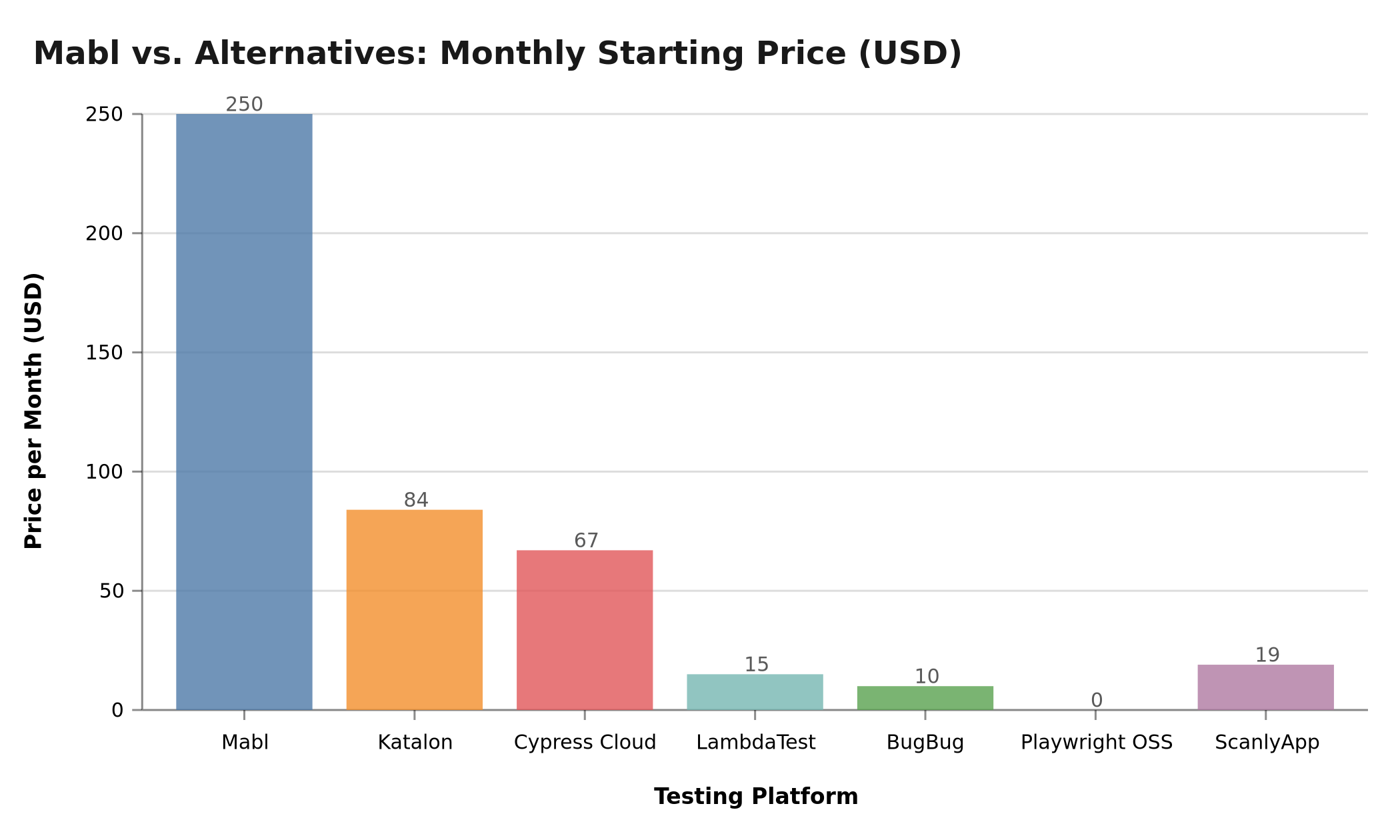 Figure: Lowest monthly published price per platform. Mabl pricing is a community-reported estimate — actual quotes may vary. ScanlyApp ($29) and BugBug ($0 free) represent the accessible end of the market. Data: vendor pricing pages and G2/Capterra reviews, March 2026.
| Platform | Free Plan | Starting Price | Pricing Model |
|---|---|---|---|
| Mabl | ✗ | ~$200–500/mo (custom) | Per-seat, enterprise quotes |
| ScanlyApp | ✓ | $29/month | Per-project (no seat tax) |
| BugBug | ✓ (unlimited runs) | Free / ~$10/mo | Per-workspace |
| LambdaTest | ✗ (trial) | $15/month | Usage + parallelism |
| Katalon Studio | ✓ (local only) | $84/user/mo | Per-seat |
| Cypress Cloud | ✓ (500/mo) | $67/month | Per-test result |
| ScanlyApp Cloud QA | ✓ | $29/month | Per-project (no seat tax) |
Capability Radar: Mabl vs. ScanlyApp
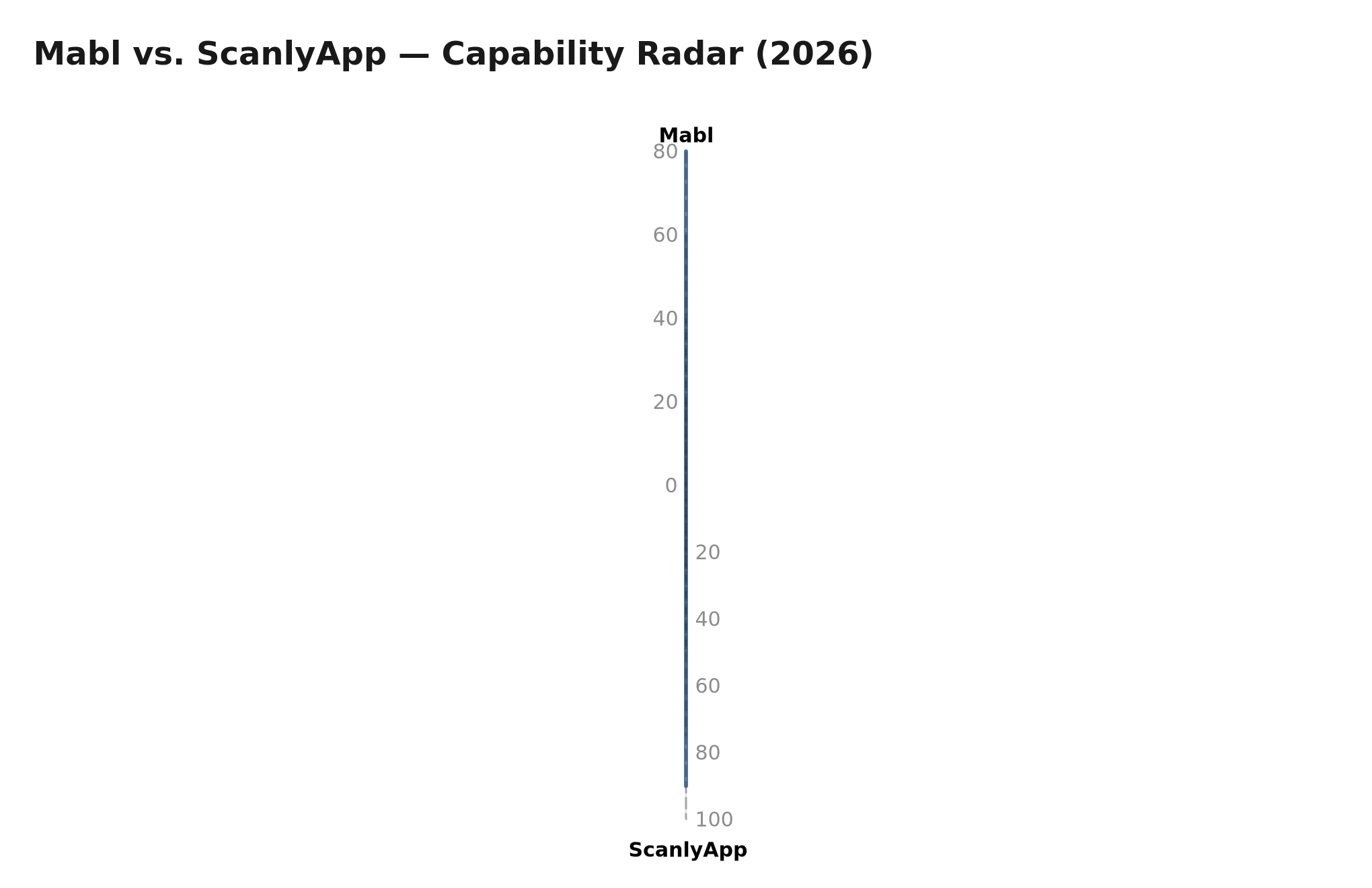 Figure: Relative capability across six dimensions (0–100 scale). Mabl leads on natural language authoring; ScanlyApp leads on pricing value, setup speed, and scheduling depth. March 2026.
How to Choose Between These 6 Alternatives
START: Why are you leaving Mabl (or not adopting it)?

PRICING / BUDGET
  └── Need free plan?
        → YES: BugBug (Chrome-only) or ScanlyApp (free tier, multi-browser)
        → NO, budget $0–100/mo: ScanlyApp ($29) or LambdaTest ($15)

TECHNICAL CAPABILITY
  └── Does your team write code?
        → NO (no-code preferred): BugBug or ScanlyApp dashboard
        → YES: Playwright + ScanlyApp OR Cypress Cloud

SCOPE
  └── Web only?
        → YES: ScanlyApp, BugBug, or Cypress Cloud
        → Mobile + web: LambdaTest or Katalon

VENDOR LOCK-IN
  └── Want to own your test code in git?
        → YES: Playwright + ScanlyApp (tests portable, execution managed)
        → NO (managed platform is fine): ScanlyApp, BugBug, LambdaTest

DATA RESIDENCY / SELF-HOST
  └── Need self-hosted or on-premise?
        → YES: ScanlyApp (Docker) or Playwright + self-hosted CI
Migration Guide: From Mabl to ScanlyApp
If you're actively moving off Mabl, here is the fastest path:
Step 1 — Audit your Mabl test suite. Export a list of all Mabl journeys (Mabl > Plans > Export). Identify: (a) which tests run on a schedule, (b) which are smoke tests vs. regression suites, (c) which are critical-path vs. nice-to-have.
Step 2 — Prioritise for rewrite vs. rebuild. Tests that are simple linear flows (load → interact → assert) are fastest to rebuild as ScanlyApp scans. Complex branching scenarios warrant proper Playwright scripts.
Step 3 — Configure ScanlyApp projects. Create one project per domain or application. Map each Mabl schedule to a ScanlyApp cron schedule.
Step 4 — Enable visual regression baselines. Run each scan once to capture baselines. Future runs will diff against these baselines pixel-by-pixel.
Step 5 — Wire up CI. Use ScanlyApp's webhook trigger to fire scans on every deployment in GitHub Actions, ensuring every push is tested before it reaches production.
Step 6 — Decommission Mabl. Run both systems in parallel for one sprint. Once ScanlyApp catches every regression your Mabl suite caught, cancel the Mabl subscription.
When Mabl Is Actually the Right Choice
Despite the positioning in this guide, Mabl is genuinely the best tool for some teams. It's worth being specific about who should stay on Mabl or choose it over the alternatives:
Large QA organisations (20+ dedicated QA engineers). At enterprise scale, Mabl's natural language test authoring and computer vision-based UI change detection justify the price. Non-developer QA engineers can author and maintain tests without writing Playwright scripts, which multiplies the productive QA headcount. The per-seat cost becomes proportionate when spread across a large, dedicated QA budget.
Teams with 10+ applications in scope. Mabl's centralised test management becomes valuable when you're tracking hundreds of test journeys across a large portfolio. Managing 10 ScanlyApp projects is simple; managing 50 is where a scaled enterprise platform with unified reporting earns its maintenance overhead.
Regulated industries with strict security requirements. Mabl offers enterprise-grade SOC 2 compliance documentation, private deployment options, and vendor security review support — which is a prerequisite for many financial services, healthcare, and government procurement processes. ScanlyApp and BugBug are cloud-first tools without comparable compliance paperwork.
Teams testing heavily Salesforce-integrated UIs. Mabl's parent company (acquired by Tricentis as part of a broader QA portfolio) has strong Salesforce testing support. If your web application has significant Salesforce embedded UI, Mabl's specialist capabilities may outweigh the price premium.
For everyone else — teams under 20 engineers, under 10 applications, and budgets under $200/month — the alternatives in this guide deliver comparable functional coverage at dramatically lower cost.
Frequently Asked Questions: Mabl Alternatives
Q: Is there a direct replacement for Mabl's natural language test generation? LambdaTest's KaneAI module is the closest equivalent at $15/month — it generates Playwright tests from plain-English descriptions like "verify a new user can sign up and reach the dashboard." GitHub Copilot integrated into a Playwright project achieves similar results for teams already paying for Copilot. ScanlyApp's scan configuration UI requires no code for standard web flows but is form-based rather than free-form NLP.
Q: Can I export my Mabl tests to Playwright? Mabl does not offer a direct export to Playwright format. Tests are stored in Mabl's proprietary journey schema. Migration requires treating your Mabl journey list as a specification document and rebuilding each journey — either as a ScanlyApp scan (for linear flows) or a Playwright script (for complex branching logic). Most teams find the rebuild takes 1–2 sprints for 20–30 journeys.
Q: How does ScanlyApp handle Mabl's auto-healing?
ScanlyApp uses Playwright's built-in semantic locator strategies rather than ML-based DOM re-analysis. getByRole, getByLabel, and getByText selectors anchor to the element's accessible meaning rather than its CSS class or DOM position — making them naturally resilient to most UI refactors without requiring any AI inference layer. For the majority of test maintenance problems in practice, this approach eliminates the breakage without the ML complexity.
Q: What does ScanlyApp catch that Mabl would also catch? Visual regressions from UI changes that don't break assertions — layout shifts, font changes, color changes, missing elements — are caught by ScanlyApp's pixel-diff engine on every run. This is the same class of problem Mabl's computer vision detects. The mechanism is pixel comparison rather than object detection, but for standard web regression testing, the outcomes are equivalent.
Q: Do I lose anything critical by moving from Mabl to ScanlyApp? The main capability gap is natural language test authoring depth. Mabl's NLP-to-test-scenario pipeline is more sophisticated than ScanlyApp's form-based configuration for complex scenarios. If non-technical QA engineers are your primary test authors and they rely heavily on freeform NLP input, migration will require either adding some developer involvement or using LambdaTest KaneAI as a test generation front-end alongside ScanlyApp execution.
Further Reading(https://mabl.com/docs)
Related articles:
