
Top 8 Checkly Alternatives and Competitors in 2026
Checkly carved out a strong niche in the DevOps-native monitoring space: run Playwright scripts against your live URLs, get alerted when they fail, and manage everything as code in your git repo. For teams that already live in playwright.config.ts and want to promote the same tests to production monitoring, it's a clean story.
But Checkly's pricing (the Team plan starts at $64/month and scales steeply with check volume), JavaScript-only tooling, and learning curve leave significant swathes of teams looking for alternatives. Maybe you need a dashboard-first experience. Maybe you need visual regression alongside uptime checks. Maybe you just want monitoring without writing and maintaining Node scripts.
This guide covers 8 Checkly alternatives tested and evaluated in March 2026, with real pricing, feature breakdowns, and the single best recommendation for teams that want Playwright-powered QA without Checkly's developer-only workflow.
What Makes Teams Look for a Checkly Alternative
Checkly's strengths are also its limitations for many teams:
- Code-first only. Every check is a JavaScript file. Non-developers can't create or edit checks without help.
- Pricing scales quickly. The Team plan ($64/month) covers 100,000 API runs and 12,000 browser runs per month — but usage spikes during load tests or busy release cycles rapidly exceed those limits.
- No built-in visual regression. Checkly monitors uptime and user flows but doesn't compare screenshots across runs.
- No test management. Checkly is a monitoring tool, not a test suite manager — there's no concept of test history, flake detection across a suite, or reporting that a QA manager would find useful.
- No dashboard for non-technical stakeholders. The Checkly UI is designed for developers, not QA leads or engineering managers who want a status overview.
According to Sematext's 2026 monitoring guide, the best synthetic monitoring tools balance code-level power with accessible dashboards — something Checkly deliberately trades off in favour of developer ergonomics.
The 8 Best Checkly Alternatives in 2026
1. ScanlyApp ⭐ Editor's Pick
Best for: Teams that want automated cloud QA scanning with scheduling, visual regression, and a dashboard everyone on the team can use — without writing monitoring-as-code.
ScanlyApp shares Checkly's best ideas (automated browser scanning, scheduling, CI/CD-aware monitoring) but packages them in a product experience that non-developers can drive. Where Checkly requires you to write a JavaScript check file, commit it to git, and configure alerting via YAML, ScanlyApp lets you define the same check through a UI and get the same deep multi-browser scanning underneath.
Head-to-head: Checkly vs ScanlyApp
| Feature | Checkly | ScanlyApp |
|---|---|---|
| Browser engine | CDP (cloud-managed) | Multi-browser cloud + self-hosted Docker |
| Check authoring | JavaScript files in git | UI config or custom scan scripts |
| Visual regression | ✗ | ✓ (pixel-diff per run) |
| Alerting | Slack, PagerDuty, webhook | Slack, webhook, email |
| Non-dev dashboard | ✗ | ✓ |
| Scheduling | Cron expressions | Cron + on-demand + CI-triggered |
| Self-hosted option | ✗ | ✓ via Docker |
| Pricing start | $64/month | $29/month |
| Free plan | ✓ (10k API runs) | ✓ |
| API testing | ✓ | ✓ |
| Test history / flake | ✗ | ✓ |
Pricing: Starter $29/month · Growth $79/month · Pro $199/month. Per-project model — no per-seat charge.
Verdict: If you're looking for Checkly's automated scanning power in a product your whole team can actually use, ScanlyApp is the direct answer. You get the same execution fidelity — real browser sessions, Lighthouse performance tracking, visual regression diffs — without needing to onboard every engineer to a monitoring-as-code workflow.
2. Better Stack
Best for: Teams that want unified incident management + uptime monitoring in one product.
Better Stack bundles synthetic monitoring, uptime checks, log management, and incident response (on-call schedules, escalation policies) into a single platform. The synthetic checks run from globally distributed locations. It's arguably the most complete observability-plus-incidents product on the market below the Datadog price point.
Pricing: Starts at $25/month (50 monitors).
Where it beats Checkly: Incident lifecycle management is built-in. You don't need a separate PagerDuty subscription. The status page feature is also polished.
Where it falls short: No native Playwright browser script execution. Browser checks are simpler click-through flows, not full Playwright scripts.
3. Pingdom (SolarWinds)
Best for: Operations teams that need uptime monitoring with real user monitoring (RUM) data.
Pingdom is one of the oldest names in website monitoring and remains popular for its simplicity: configure a URL, set a monitoring interval, receive alerts. The SolarWinds umbrella adds RUM data alongside synthetic checks — a combination Checkly notably lacks.
Pricing: Starts at $10/month (10 monitors, 1-minute check interval).
Limitation vs Checkly: No Playwright support. Transaction monitoring requires manually building scenarios in Pingdom's recorder — you can't bring existing Playwright scripts.
4. UptimeRobot
Best for: Budget-conscious teams that need basic uptime monitoring with no frills.
UptimeRobot is the go-to for teams that need "is my website up?" alerts without any configuration complexity. The free tier monitors 50 websites at 5-minute intervals. Paid plans start at $8/month.
It doesn't compete on features with Checkly — there's no Playwright support, no API monitoring depth, no browser tests. But for teams that don't need any of that and find Checkly's pricing unjustifiable for uptime checks alone, UptimeRobot is a rational choice.
5. Sematext Synthetics
Best for: Teams already in the Sematext observability ecosystem (logs + metrics + monitoring).
Sematext Synthetics offers HTTP monitor checks and browser monitoring backed by real browsers. Pricing is granular: $2/month per HTTP monitor and $7/month per browser monitor — which makes it one of the cheapest options for teams with a small number of critical flows to watch.
Integration with Sematext's log management and infrastructure monitoring products makes it an attractive all-in-one if you're not already on Datadog or Grafana.
6. Datadog Synthetic Monitoring
Best for: Enterprises already on Datadog that want monitoring integrated with APM, logs, and traces.
Checkly and Datadog Synthetic Monitoring are the two most capable Playwright-backed monitoring platforms in 2026. Datadog's advantage is its unified platform: a browser check that fails links directly to the APM trace and related log entries, which dramatically accelerates root-cause analysis.
Pricing: $5 per 10,000 API runs; $12 per 1,000 browser runs. At scale this is expensive — a Checkly Team plan's equivalent volume costs $120–$200/month on Datadog.
Verdict: If you're paying for Datadog APM anyway, adding Synthetics is a natural extension. If you're not already a Datadog customer, the operational cost makes it hard to justify for monitoring alone.
7. New Relic Synthetics
Best for: Teams on the New Relic platform that want synthetics integrated with full-stack performance data.
New Relic Synthetics supports scripted browser tests (Selenium WebDriver API), API monitors, and ping monitors. The platform runs checks from 17 global locations. The 100GB free tier makes it accessible for smaller teams.
Limitation: New Relic's scripted monitor API is Selenium-based, not Playwright. Migrating Playwright tests requires rewriting them in New Relic's Selenium dialect.
8. Assertible
Best for: API-first teams that want scheduled HTTP monitoring with test assertions, not browser testing.
Assertible focuses narrowly on API monitoring: schedule HTTP requests, write assertions on responses (status codes, JSON body, response time), and receive alerts on failures. There's no browser automation — it's purpose-built for API health monitoring.
Pricing: Starts at $25/month (25 monitors).
Verdict: If your Checkly usage is exclusively API checks with no browser tests, Assertible is a focused, cheaper alternative. If you need any browser automation, it's not the right tool.
Pricing Comparison
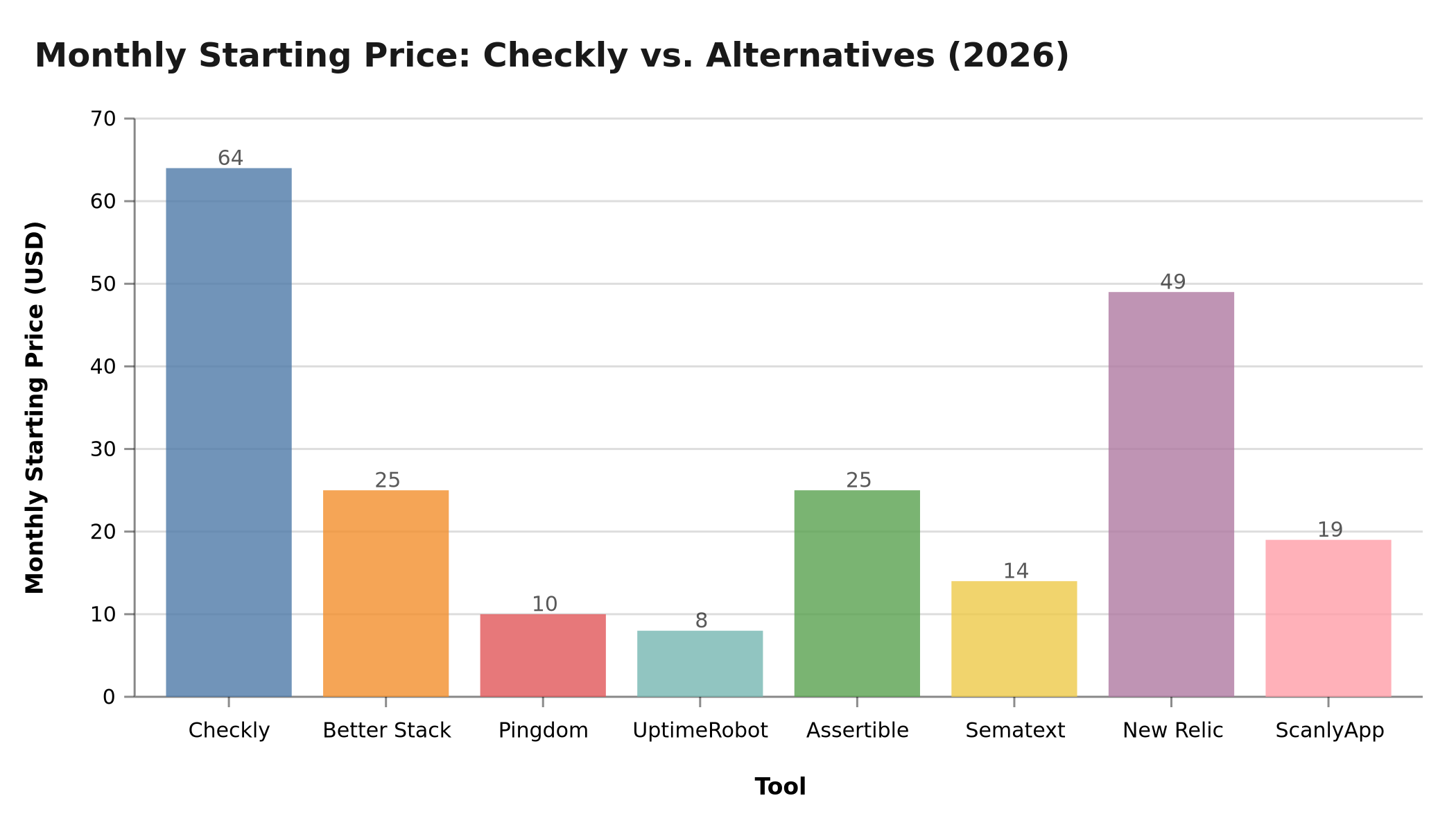 Figure: Lowest monthly paid tier across 8 tools. Free tiers shown as $0. Data: vendor pricing pages, March 2026.
| Tool | Free Plan | Lowest Paid Tier | Pricing Model |
|---|---|---|---|
| Checkly | ✓ (10k API runs/mo) | $64/month | Usage-based tiers |
| ScanlyApp | ✓ | $29/month | Per-project |
| Better Stack | ✗ | $25/month | Per monitor |
| Pingdom | ✗ | $10/month | Per monitor |
| UptimeRobot | ✓ (50 monitors) | $8/month | Per monitor |
| Sematext Synthetics | ✗ | $2/HTTP monitor | Per monitor |
| Datadog Synthetics | ✗ | $5/10k API runs | Usage-based |
| New Relic Synthetics | ✓ (100GB free) | Usage-based | Usage-based |
| Assertible | ✗ | $25/month | Per monitor |
Feature Radar: Checkly vs. ScanlyApp
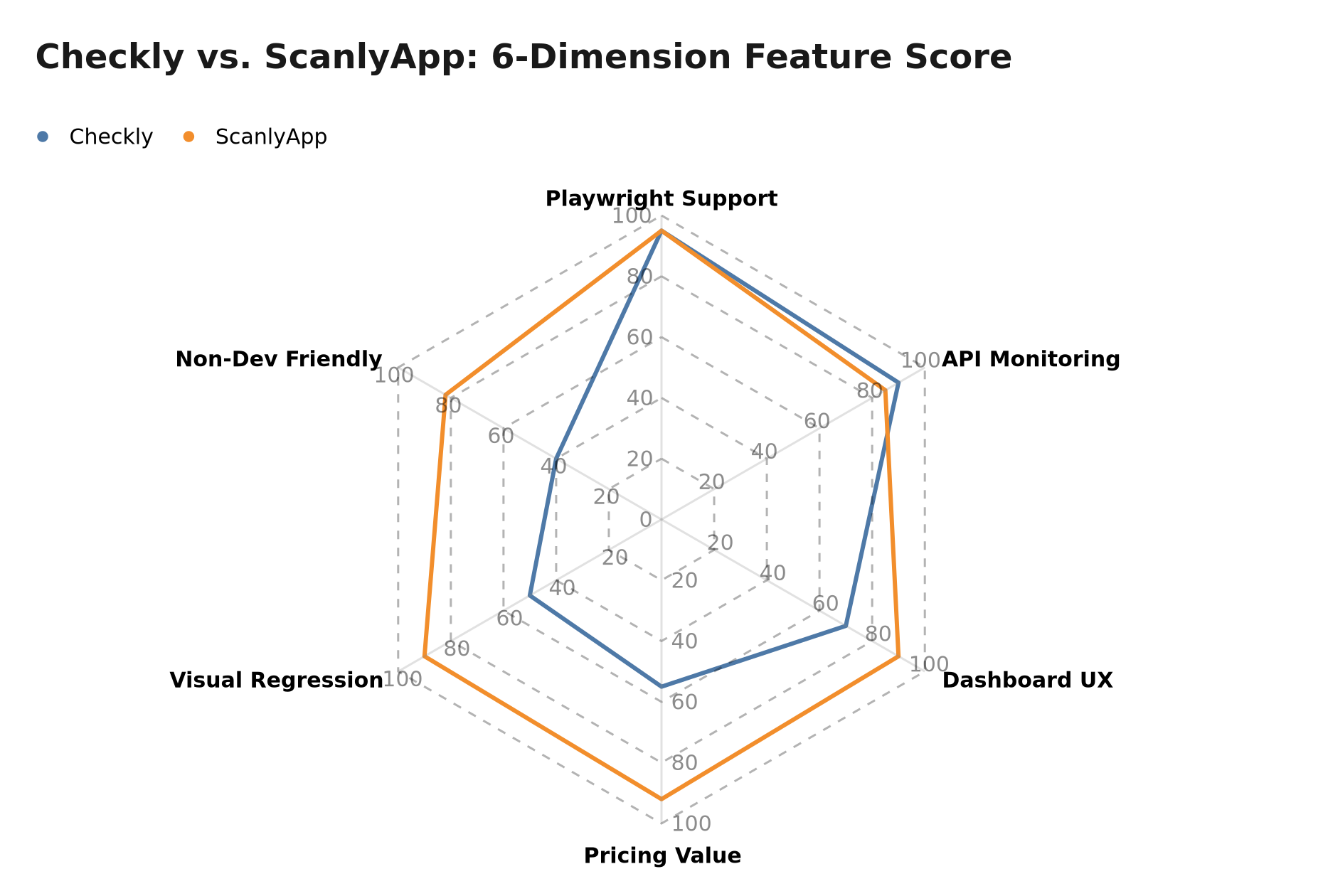 Figure: Feature scores (0–100) comparing Checkly and ScanlyApp across Playwright support, API monitoring depth, dashboard UX, pricing value, visual regression, and non-developer accessibility. March 2026.
Choosing the Right Checkly Alternative
flowchart TD
    A[Looking for Checkly alternative] --> B{Primary need?}
    B -- Uptime alerts only --> C{Budget?}
    B -- Browser + API monitoring --> D{Dev team or mixed?}
    B -- Full observability platform --> E[Datadog or New Relic]
    C -- Free / minimal --> F[UptimeRobot]
    C -- Some budget --> G[Pingdom or Better Stack]
    D -- Dev team, code-first --> H[Checkly stays fine OR Playwright + CI]
    D -- Mixed team, need dashboard --> I[ScanlyApp]
    D -- API only --> J[Assertible]
Figure: Decision tree for selecting the right Checkly alternative based on team type and monitoring requirements.
The Case for ScanlyApp Over Checkly for Web QA Teams
Checkly is excellent monitoring-as-code infrastructure. But "infrastructure" is the right word — it's designed for platform engineers, not QA teams. If your team:
- Has QA engineers who aren't writing JavaScript daily
- Wants a dashboard that a product manager can load to see test status
- Runs visual regression tests alongside uptime monitoring
- Wants scheduled scans without managing a git repository of check files
- Is paying $64/month+ for features they only use 20% of
…then ScanlyApp gives you everything Checkly's monitoring core delivers — Playwright execution, scheduling, CI hooks, alerting — inside a product experience designed for cross-functional teams, at less than a third of the price.
Synthetic Monitoring vs. Full Web QA: How to Know Which You Need
One reason teams look for Checkly alternatives is that they're not sure whether they need synthetic monitoring or full web QA testing — and Checkly's code-first positioning assumes you're solving the monitoring problem.
Synthetic monitoring answers: "Is my website up and are critical user flows completing successfully right now?" It runs on a schedule, alerts on failures, and its primary output is availability and latency data. Checkly, Pingdom, UptimeRobot, and Better Stack are synthetic monitoring tools by design.
Web QA testing answers: "Did my latest code deploy break anything — including things the site is technically up for?" It runs on deploy, compares UI state across code versions, and catches regressions that monitoring misses because the service is up but a button is misaligned, a font changed, or a critical form field disappeared. Visual regression testing lives in this category.
Most product teams need both. The common failure mode is paying for one and expecting the other. Checkly gives you scheduling and uptime assurance for user flows; it will not tell you that your last deploy shifted the checkout button 80px to the left on Firefox.
ScanlyApp occupies both categories intentionally. It runs on a schedule like a monitoring tool, executes full Playwright user flows like a QA platform, and captures pixel-level visual diffs on every run. For teams paying for Checkly and a separate visual regression tool — or for teams that had neither — ScanlyApp consolidates both functions at $29/month.
How to Migrate from Checkly to ScanlyApp: A Step-by-Step Guide
Step 1 — Inventory your Checkly checks. In the Checkly dashboard, export or list all check names, target URLs, assertion logic, and alert channel configurations (Slack workspace ID, webhook URL, PagerDuty key). This becomes your ScanlyApp project spec.
Step 2 — Create ScanlyApp projects. Create one ScanlyApp project per application or domain. If you have Checkly check groups for staging and production environments, create matching ScanlyApp staging and production projects.
Step 3 — Migrate Playwright scripts.
Checkly browser checks written as Playwright tests (test('Login flow', async ({ page }) => { ... })) can be pasted directly into ScanlyApp's Playwright runner interface with minimal modification. Remove Checkly-specific imports and ensure you're using standard @playwright/test assertion syntax throughout.
Step 4 — Configure schedules.
ScanlyApp uses standard cron expressions. A Checkly check running every 10 minutes becomes */10 * * * * in ScanlyApp. On-demand triggers are available for CI-triggered scans on deployment.
Step 5 — Connect alert channels. Configure ScanlyApp webhook alerts to point to the same Slack channel or incident management system as your Checkly alerts. Run both systems in parallel for 48–72 hours to confirm ScanlyApp fires on the same failure conditions before decommissioning Checkly.
Step 6 — Enable visual regression baselines. This is the capability you gain that Checkly doesn't provide. Once your first ScanlyApp scan run succeeds, it captures a baseline screenshot. Every future run diffs against this baseline, surfacing layout regressions that assertion-based checks would miss entirely.
Expected migration time: 2–3 days of engineering effort for a Checkly account with 10–20 checks. The most time-consuming part is the initial check inventory and alerting reconfiguration.
Frequently Asked Questions
Q: Can ScanlyApp run Checkly's Monitoring-as-Code (MaC) check files? ScanlyApp accepts standard Playwright test scripts, so Checkly browser checks written as Playwright tests migrate directly. Checkly's API monitors (pure HTTP checks without a browser) have equivalent API testing functionality in ScanlyApp's assertion layer.
Q: Is ScanlyApp reliable enough for production monitoring? ScanlyApp runs checks from cloud infrastructure with alerting latency comparable to Checkly's browser checks. For pure ping/HTTP uptime checks with sub-60-second intervals, pairing ScanlyApp with UptimeRobot ($8/month) covers the full monitoring spectrum.
Q: Does ScanlyApp support multi-region monitoring like Checkly? Multi-region check execution is available on ScanlyApp's paid plans across primary cloud regions. For teams requiring 30+ global monitoring nodes at high frequency, Checkly's network is broader for that specific use case — but for the majority of web QA teams, single-region Playwright execution plus visual regression delivers more actionable value.
- Checkly docs: Getting started with Playwright monitors
- Sematext: 14 Best Website Monitoring Tools in 2026
- BetterStack: Top 10 Checkly Alternatives 2026
Related articles:
