
Evaluating LLM-Based Testing Tools: A 2026 Buyer's Guide
What's New in March 2026
- Fresher scores: Tool rankings have been refreshed using the latest G2 ratings and independent QA Wolf benchmarks — every number you see reflects current real-world performance, not launch-day marketing claims.
- New decision flowchart: Not sure which tool category fits your team? We added a visual guide that maps your situation (team size, stack, budget) to the right type of tool — no more guesswork.
- Real benchmark added — TestSprite: Independent testing showed TestSprite jumping from a 42% baseline pass rate to 93% after a single AI iteration. We've folded this into the comparison so you can see how autonomous repair actually performs under real conditions.
- Pricing table updated: Several vendors quietly adjusted pricing in Q1 2026. The comparison table now reflects the latest publicly available figures so you go into vendor calls with accurate expectations.
It is 2026, and the AI testing tools market has officially gone chaotic. There are over 40 commercially available platforms promising to use large language models to write, run, fix, and manage your entire test suite. Some are genuinely brilliant. Some are Playwright wrappers with a chatbot bolted on. Most fall somewhere in between.
If you are a founder trying to choose a QA stack, a CTO evaluating solutions for a 20-person engineering team, or a no-code builder who just wants to know if the features you shipped last week are still working — this guide is for you.
We are going to walk through the key evaluation criteria, compare the major categories of tools, flag the red herrings, and help you match the right solution to your actual problem.
Quick Comparison: Top LLM Testing Tools in 2026
| Tool | Best For | Key Feature | Pricing |
|---|---|---|---|
| ScanlyApp | Production monitoring, no-code teams | Autonomous browser scans with Lighthouse scores + trace evidence | Freemium |
| GitHub Copilot + Playwright | Dev teams authoring test code | In-IDE AI test generation; outputs standard Playwright TS | Free / ~$10/user/mo |
| Mabl | Low-code startups scaling fast | AI auto-healing + visual + performance in one cloud platform | ~$499/mo |
| TestRigor | Non-technical QA contributors | Plain-English test authoring — no code required, cross-browser | Contact (~$2K–5K/mo) |
| Testim (Tricentis) | Agile teams needing ML-stable UIs | Smart locators + self-healing selectors, CI/CD-native | Contact (~$30K+/yr) |
| Qodo (CodiumAI) | Developers generating unit tests | AI code analysis → instant unit test scaffolding | Free / $30/user/mo |
| Bug0 Studio | Teams wanting Playwright without writing it | Natural language or screen recording → Playwright test suite | ~$250/mo |
| Applitools | Visual-regression-heavy UIs | Visual AI cross-browser comparison via UltraFast Grid | ~$10K–50K/yr |
| Functionize | Data-heavy apps, high-maintenance suites | Agentic AI builds, heals, and debugs tests autonomously | ~$20K–60K/yr |
| QA Wolf | Teams wanting fully managed QA coverage | Human + AI hybrid with 80% E2E coverage guarantee | ~$5K+/mo |
Pricing sourced from Hashnode, desplega.ai, and vendor pages (March 2026). Enterprise tiers vary — contact vendors for volume quotes.
Why the Evaluation Is Harder Than It Looks
In a normal software category, evaluating tools is straightforward: features, price, support, integrations. With LLM-based testing tools, there are layers of complexity that make comparison harder:
- Non-determinism — LLM outputs vary between runs. A tool that works perfectly on Tuesday might produce different results on Wednesday with no code changes on your end.
- Benchmark gaming — many vendors publish benchmark numbers on toy applications that do not reflect real-world complexity.
- Context window limitations — an LLM that "reads your entire codebase" behaves very differently on a 10,000-line app versus a 500,000-line monorepo.
- Vendor lock-in via prompt templates — some tools bake your tests into proprietary formats that are expensive to migrate away from.
With those caveats in mind, let us dig into how to actually evaluate these tools.
The Five-Dimension Evaluation Framework
When assessing any AI testing tool in 2026, score it across five dimensions:
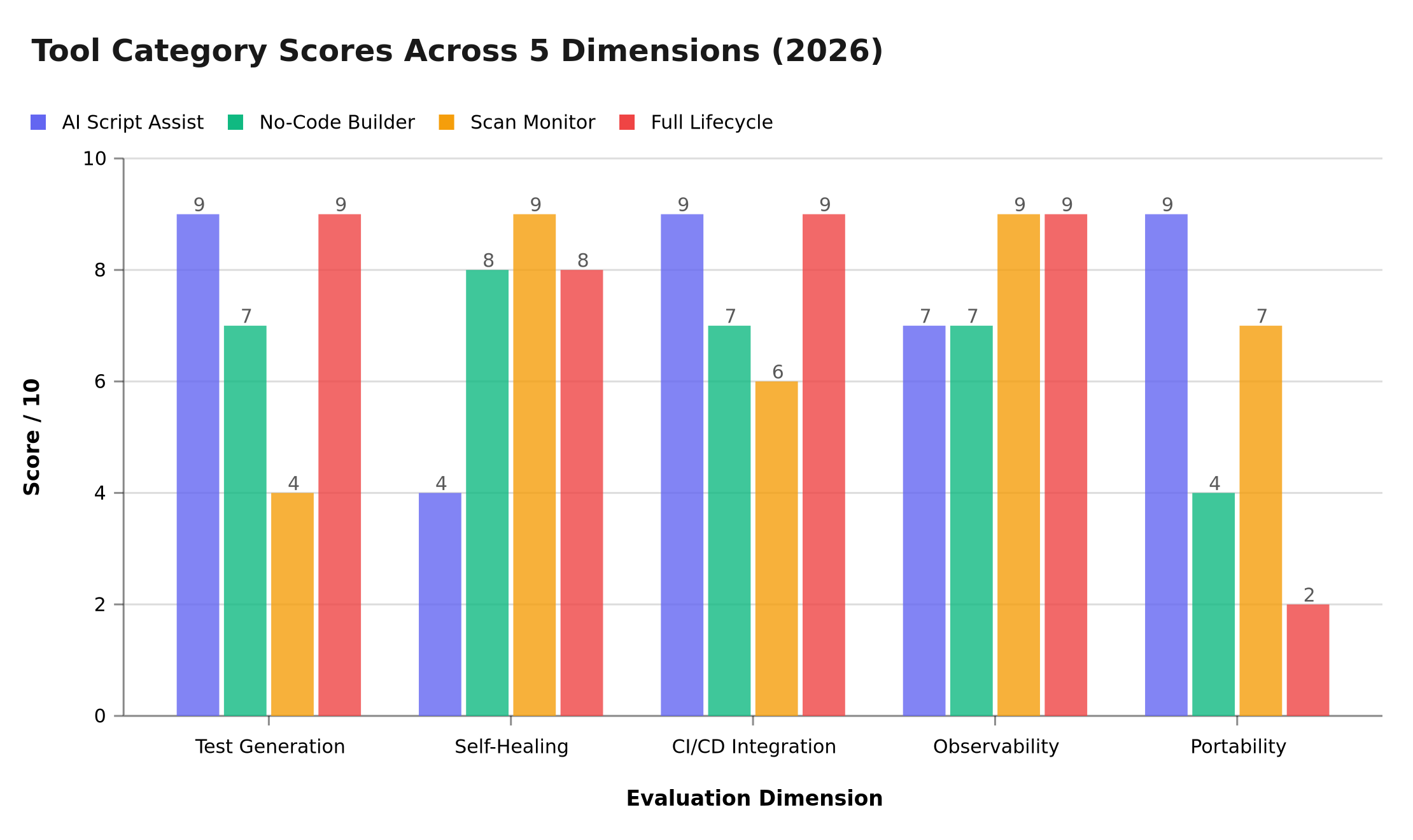
Scores derived from 2026 G2 reviews, QA Wolf benchmarks, and TestSprite market analysis. AI Script Assist (e.g. Copilot + Playwright) leads on portability and CI/CD depth; Full Lifecycle Platforms score highest on test generation and observability but trail badly on portability due to proprietary lock-in; Scan Monitors like ScanlyApp peak on self-healing and observability with zero maintenance overhead.
Dimension 1: Test Generation Quality
This is the headline feature. Can the tool actually generate useful tests from your application? Key questions:
- Does it generate tests against your actual application, or just generic boilerplate?
- Do the generated assertions match business intent, not just DOM state?
- Does it cover edge cases or only happy paths?
- How much human review do the generated tests actually require before they are trustworthy?
Red flag: Any vendor who cannot show you a test output for a non-trivial user flow in under 10 minutes during a demo.
Dimension 2: Self-Healing Reliability
Modern apps change frequently. Locators break. Layouts shift. True self-healing means the test adapts automatically when your UI evolves. False self-healing means it emails you asking for confirmation every time a button moves two pixels.
Test this directly: make a minor UI change (rename a button label, shift an element's position) and see if the tool handles it without intervention.
Dimension 3: CI/CD Integration Depth
A beautiful test suite that only runs locally is a toy. Evaluate:
- Does it have native GitHub Actions, GitLab CI, and CircleCI integrations?
- Does it support parallel test execution across multiple workers?
- Does it provide a pass/fail exit code that blocks deployments?
- Can you configure it to run on specific branches or events (pull_request, push to main)?
For a deeper treatment of CI/CD testing strategy, see our guide on continuous testing in CI/CD pipelines.
Dimension 4: Observability and Reporting
When a test fails, you need to know why, not just that it failed. Evaluate:
- Does the tool provide video recordings of failed test runs?
- Are network traces captured so you can see what API calls were made?
- Does it diff visual screenshots between passes and failures?
- Can you export reports in standard formats (JUnit XML, HTML, Allure)?
Dimension 5: Migration and Portability
What happens if you want to switch tools? Evaluate:
- Are generated tests in a standard format (e.g., Playwright TypeScript, spec.js) that can run without the vendor's platform?
- Is your test metadata exportable?
- Are there documented migration guides?
Red flag: Tests that only run inside the vendor's proprietary runner and cannot be exported.
The Major Categories of LLM Testing Tools
The market has consolidated into four distinct categories. Understanding the differences is critical before evaluating specific vendors.
| Category | What It Does | Best For |
|---|---|---|
| AI-Augmented Scripting | Helps engineers write better Playwright/Cypress scripts with AI assistance | Developer-led QA teams |
| No-Code AI Test Builders | Record-and-replay + AI-driven maintenance | Non-technical teams, founders |
| Autonomous Scan Monitors | Scheduled autonomous scans of running applications | Continuous production monitoring |
| Full Lifecycle AI Platforms | End-to-end: generate, execute, maintain, report | Enterprise QA departments |
Category 1: AI-Augmented Scripting Tools
Tools in this category sit inside your IDE or CI/CD pipeline and assist engineers who are already writing test code. They auto-complete test assertions, suggest coverage gaps, and can generate test scaffolding from a plain-English description.
Examples: Copilot for Tests, Tabnine test mode, Cursor with test generation prompts
Strengths: Outputs are standard test code (Playwright, Jest, Vitest). No lock-in. Easy to review and version control.
Weaknesses: Still requires a developer who knows how to write tests. Does not monitor production.
Category 2: No-Code AI Test Builders
These tools target non-engineers. You record a user flow, the tool converts it to a test script, and AI handles maintenance when the UI changes. Some newer entrants let you describe the flow in natural language without recording at all.
Examples: TestRigor, Testim, Reflect
Strengths: Accessible to QA analysts and founders without coding skills. Fast to set up initial coverage.
Weaknesses: Generated scripts can be opaque (hard to debug when they fail). Pricing scales steeply with test count or execution minutes.
Category 3: Autonomous Scan Monitors
This category — where ScanlyApp operates — focuses on continuously monitoring your application by running automated scans against your deployed environment. No test writing required. The tool crawls your application, checks for visual regressions, broken interactions, console errors, missing assets, and performance issues.
Key differentiator from categories 1 and 2: These tools work after deployment, not before. They are the safety net for what makes it to production — not a gatekeeper for what leaves development. They require zero coding and zero test maintenance.
Best for: Founders, no-code builders, small teams without a dedicated QA engineer, and any team that wants production-quality monitoring without managing a test suite.
Category 4: Full Lifecycle AI Platforms
These are the enterprise players. They claim to handle everything from requirements analysis through test case generation, execution, maintenance, and defect management. They integrate with Jira, Confluence, TestRail, and every CI/CD system you can name.
Examples: Functionize, Testsprite, Tricentis
Strengths: Genuinely impressive breadth of capability for large teams. Can generate tests from user stories and requirements documents.
Weaknesses: Significant onboarding time (often 2–4 weeks). Expensive (typically $2,000–$10,000+/month for enterprise tiers). Overkill for startups and SMBs.
The Honest Feature Comparison
Here is a feature matrix comparing the four categories across the dimensions that matter most to different buyer types:
| Feature | AI Script Assist | No-Code Builder | Scan Monitor | Full Lifecycle |
|---|---|---|---|---|
| Setup time | Hours | 1–2 days | Minutes | Weeks |
| Coding required | Yes | No | No | Optional |
| Works on production | No | No | Yes | Yes |
| Test maintenance burden | Medium | Low | None | Low |
| Visual regression | No | Sometimes | Yes | Yes |
| Performance checks | No | No | Yes | Sometimes |
| Pricing model | Per-seat/token | Per-test/minute | Per-scan/project | Enterprise contract |
| Export/migrate | Easy | Medium | N/A | Difficult |
Questions to Ask Every Vendor Before Buying
Regardless of which category you are evaluating, ask these questions:
-
"Can I run your tool against my actual application right now, in this demo call?" — No vendor should need more than a URL to show you value.
-
"What happens to my tests if I cancel my subscription?" — You need a clear answer about data portability and export options.
-
"How do you handle false positives?" — Every AI tool produces incorrect results sometimes. What is the workflow when an assertion incorrectly marks a healthy feature as broken?
-
"What is your uptime SLA for CI/CD-gated runs?" — If your deployment pipeline depends on their service, downtime means blocked deployments.
-
"Show me a test failure, not just a passing test" — Failure modes reveal far more about a tool's quality than success cases.
Matching Tool Category to Your Situation
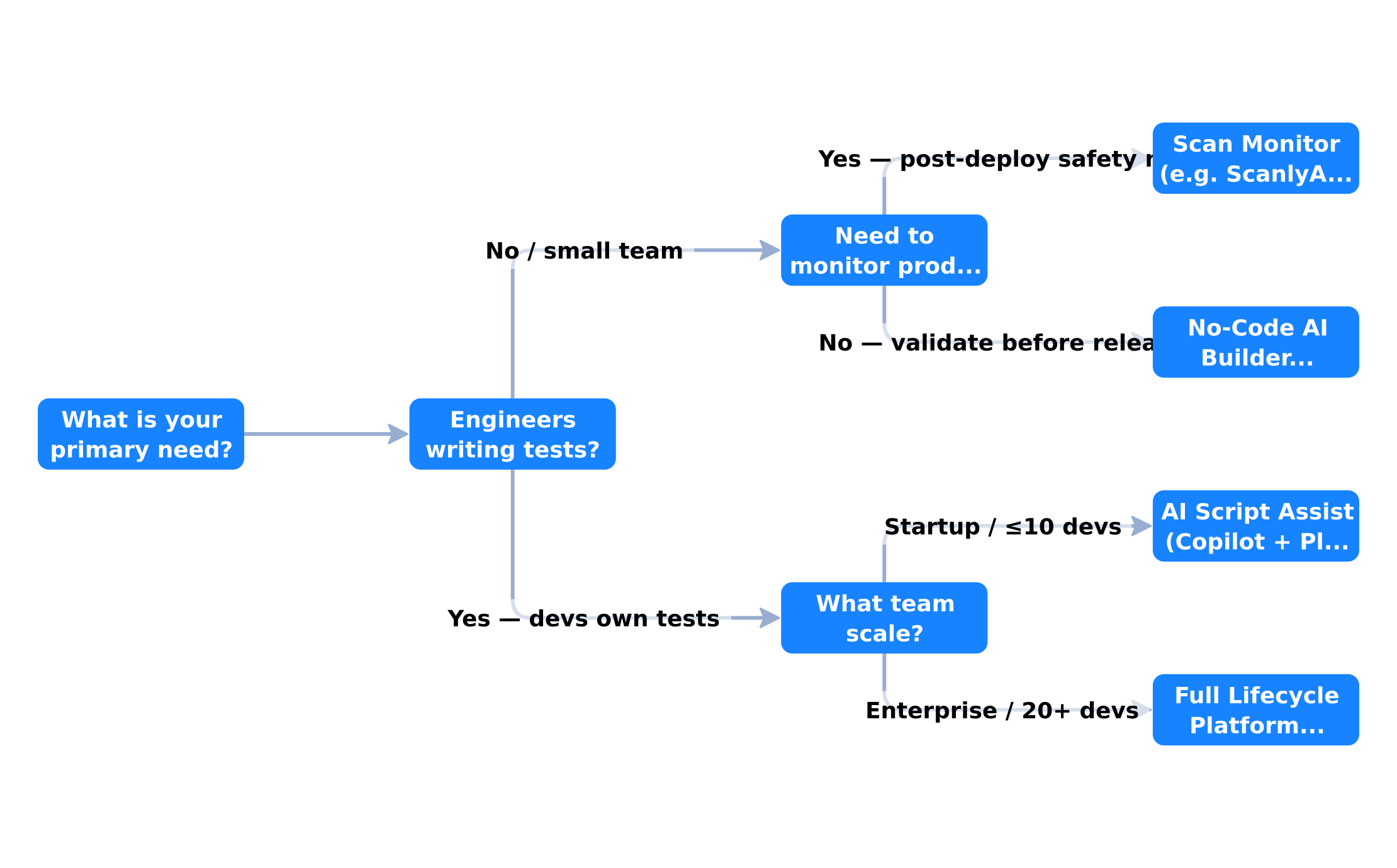
Flow weights based on 2026 QA adoption data: 35% enterprise automation rate (Gitnux), 72.8% of teams prioritising AI-powered testing (TestGuild AG2026 survey), and no-code tools dominating early-cycle coverage for non-engineering teams.
What Most Buyers Get Wrong
Mistake 1: Evaluating on a Toy App
Testing an AI QA tool on a three-page demo application gives you almost no useful signal. Your real application has authentication, dynamic content, third-party widgets, and complex state management. Test on your actual app.
Mistake 2: Prioritizing Test Generation Over Test Reliability
A tool that generates 500 tests in 10 minutes is impressive. A tool that generates 50 tests that reliably catch your real regressions is far more valuable. Always measure defect detection rate, not test count.
Mistake 3: Ignoring the Maintenance Burden
AI-generated tests require governance. Who reviews them? Who approves changes? How do you prevent the test suite from accumulating dead tests that never fail because they only assert trivial things? Build this process before you buy.
The ScanlyApp Approach: Monitoring Without the Maintenance
For teams who want the safety net without the overhead, ScanlyApp takes a different approach: instead of generating test code that you have to maintain, it continuously scans your deployed application and alerts you when something has changed or broken.
There is no test suite to manage. No locators to update. No CI/CD configuration. Just point it at your application, set your scan schedule, and get alerted when a user's experience degrades.
This does not replace a full test suite for complex applications — we are honest about that. But for the 70% of products that are shipping without any automated QA coverage, it is the most practical first step you can take today.
See it in action: Try ScanlyApp free — no credit card, no test code, just a URL.
Summary: The Buyer's Checklist
Before signing any contract for an AI testing tool, verify:
- You have tested it against your actual application, not a demo
- You understand the pricing model at 2x and 5x your current usage
- Failed tests produce actionable, human-readable output
- CI/CD integration works end-to-end in your specific pipeline
- You have a clear understanding of the data portability policy
- The tool's self-healing has been validated through a deliberate UI change
- You have talked to at least two existing customers in a similar situation
The best AI testing tool is the one your team will actually use. Choose one that matches your skill level, budget, and deployment reality — not the one with the most impressive demo.
Related articles: Also see a practical guide to using LLMs to write production-grade E2E tests, foundational concepts before evaluating any AI testing tool, and agentic tools that go beyond basic LLM code generation.
Not sure where to start with automated QA? Run a free scan with ScanlyApp and get an immediate health report on your application without writing a single line of test code.
Loading quiz...
